
Introduction
If the title of this article sounds familiar, it’s probably because I already used it 2 years ago when talking about another compliance policy management tool: Open Policy Agent (OPA) and its Kubernetes counterpart, Gatekeeper.
And I won’t lie, I haven’t done much OPA since that 2020 article…
The first reason is that I changed companies right at that time and had other priorities at my new employer.
The second reason, probably more accurate but perhaps less flattering, is that OPA is not exactly user friendly. Especially because of rego, the compliance policy language.
Since then, I discovered Kyverno, a newcomer in the “cloud native” game (recently promoted to “CNCF sandbox” level) that offers compliance policies for Kubernetes only (unlike OPA + rego which are general-purpose), written in YAML.
With Kyverno, policies are managed as Kubernetes resources and no new language is required to write policies.
Take that, rego ;-)
Note: This article will remain relatively simple, it’s an introduction. We’ll go further in subsequent articles (writing your own policy, the UI, etc).
I’m not going to innovate much compared to the OPA article and will start from the same use case: preventing two developers from using the same URL for their web app deployed on Kubernetes (because we’ve seen it’s pretty bad when that happens).
And you’ll see that the initial learning curve is MUUUCH more accessible with Kyverno than with OPA (even though it might annoy half of my Twitter followers that I’m once again talking about YAML).
Prerequisites
Same setup as for OPA / Gatekeeper, you need Kube 1.14 to use Kyverno. Version 1.14 wasn’t the latest back in 2020, it’s practically prehistoric by now ;-).
Your Kubernetes cluster version must be above v1.14 which adds webhook timeouts.
Obviously, you also need admin access to the cluster, because we’ll have to create Validating Admission Webhooks and CRDs. Again, I’ll refer you to the previous article and the official documentation if this doesn’t ring a bell.
In short, we’re going to insert ourselves into Kubernetes’ deployment process to prevent people from doing things that don’t follow your best practices (with webhooks) and we’ll add extra APIs to extend Kubernetes (the CRDs), so we can describe what’s not allowed.
Deployment
Installation-wise, we’re keeping it simple and efficient.
Kyverno offers several Helm Charts:
- one for Kyverno itself
- one for Policy Reporter
- one containing a “pack” of default rules, configured as “non-blocking” (basically the equivalent of what you could do with Pod Security Policies)
For this article, I’m only interested in Kyverno itself. But as I mentioned above, we’ll discuss the other two in a future post.
Let’s start by adding Kyverno itself:
$ helm repo add kyverno https://kyverno.github.io/kyverno/
$ helm repo update
$ helm install kyverno kyverno/kyverno --namespace kyverno --create-namespace
  NAME: kyverno
  LAST DEPLOYED: Mon Jul 25 21:55:11 2022
  NAMESPACE: kyverno
  STATUS: deployed
  REVISION: 1
  NOTES:
  Chart version: v2.5.2
  Kyverno version: v1.7.2

  Thank you for installing kyverno! Your release is named kyverno.
  ⚠️  WARNING: Setting replicas count below 3 means Kyverno is not running in high availability mode.

  💡 Note: There is a trade-off when deciding which approach to take regarding Namespace exclusions. Please see the documentation at https://kyverno.io/docs/installation/#security-vs-operability to understand the risks.
Note: you’ll notice the WARNING during install. By default, Kyverno is deployed with a single replica. If it crashes, you can no longer deploy or modify anything on your cluster (it happened to me). The solution to recover is to delete Kyverno’s webhooks to unblock the situation. And of course, give it more room (higher limits, especially for RAM) and definitely 3 replicas (or more)…
Note 2: It’s probably best to exclude certain namespaces (kube-system, kyverno, …) from Kyverno’s scope to avoid nasty surprises. Thibault Lengagne’s blogpost at Padok also discusses this (link at the bottom of the article).
What did we deploy?
At first glance, not much. If you run kubectl -n kyverno get all, you’ll find just a Pod (+ReplicaSet +Deployment) and two Services.
But behind the scenes, we’ve deployed much more than that ;)
Looking for CRDs, you’ll see we have quite a few new objects at our disposal.
$ kubectl api-resources --api-group=kyverno.io
  NAME                          SHORTNAMES   APIVERSION            NAMESPACED   KIND
  clusterpolicies               cpol         kyverno.io/v1         false        ClusterPolicy
  clusterreportchangerequests   crcr         kyverno.io/v1alpha2   false        ClusterReportChangeRequest
  generaterequests              gr           kyverno.io/v1         true         GenerateRequest
  policies                      pol          kyverno.io/v1         true         Policy
  reportchangerequests          rcr          kyverno.io/v1alpha2   true         ReportChangeRequest
  updaterequests                ur           kyverno.io/v1beta1    true         UpdateRequest
Similarly, we also have new webhooks:
$ kubectl get validatingwebhookconfigurations.admissionregistration.k8s.io
  NAME                                      WEBHOOKS   AGE
  kyverno-policy-validating-webhook-cfg     1          8m48s
  kyverno-resource-validating-webhook-cfg   2          8m48s

$ kubectl get mutatingwebhookconfigurations.admissionregistration.k8s.io
  NAME                                    WEBHOOKS   AGE
  kyverno-policy-mutating-webhook-cfg     1          11m
  kyverno-resource-mutating-webhook-cfg   2          11m
  kyverno-verify-mutating-webhook-cfg     1          11m
What’s it for? How does it work?
To simplify, we’ll describe what we don’t want to allow on our cluster using the ClusterPolicy CRD.
Based on the rules we write, the webhooks will insert themselves into Kubernetes’ normal resource deployment process to either allow or reject them.
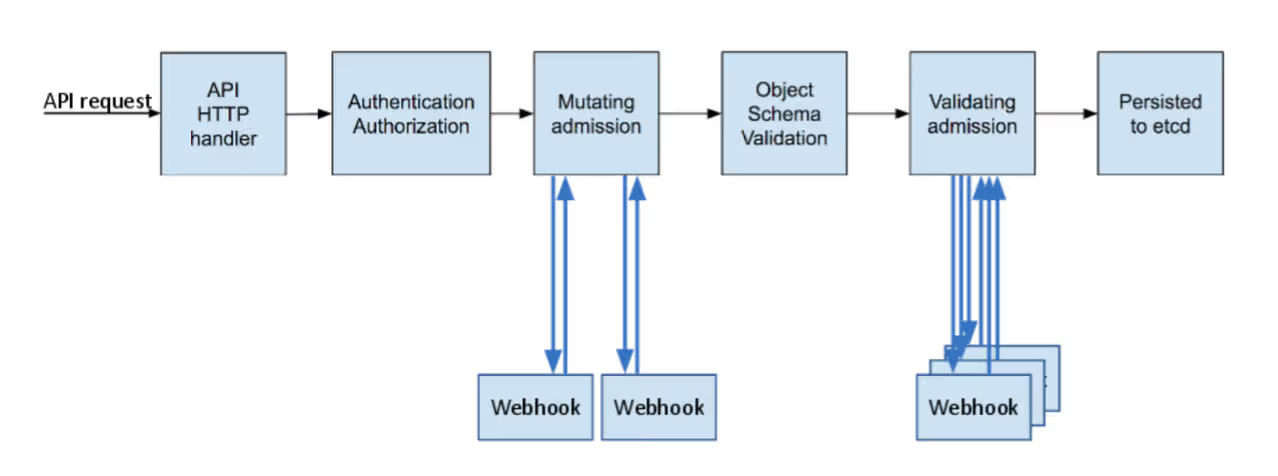
Kubernetes Blog - A Guide to Kubernetes Admission Controllers
Ingress with the same URL example
Enough theory, the easiest way is to show you. As I mentioned at the beginning of the article, to compare the two products, I’m going to start from the same use case.
In my Kubernetes clusters, I want to prevent two applications from creating an Ingress with the same URL, because in my case, that’s not allowed. It’s a sign of a copy/paste error from one Helm Chart to another (or any other human error).
The consequence of this error is a conflict in routing incoming HTTP requests, and you end up with some kind of janky round robin where half the requests hit the wrong backend. In production, that’s a bad look, and you risk ending up with customers complaining on Twitter that the application is down ;-).
Just as OPA provides a community policy to address this problem, Kyverno has the same.
We’ll look in more detail in the next article at how these rules are built. For now, we’ll just deploy this rule in “audit” mode and see if it works.
spec: validationFailureAction: audit
$ kubectl apply -f https://raw.githubusercontent.com/kyverno/policies/main/other/unique-ingress-paths/unique-ingress-paths.yaml
  clusterpolicy.kyverno.io/unique-ingress-host created
If you have a Kubernetes cluster at hand, I suggest you apply these two Ingresses, configured to receive traffic from the same URL (toto.example.org):
$ for counter in 1 2; do
cat > ingress${counter}.yaml <<EOF
apiVersion: networking.k8s.io/v1
kind: Ingress
metadata:
  name: ingress${counter}
spec:
  rules:
  - host: toto.example.org
    http:
      paths:
      - path: /
        pathType: Prefix
        backend:
          service:
            name: service${counter}
            port:
              number: 4200
EOF
done

$ kubectl apply -f ingress1.yaml
  ingress.networking.k8s.io/ingress1 created
$ kubectl apply -f ingress2.yaml
  ingress.networking.k8s.io/ingress2 created
Normally, nothing happens. Kyverno doesn’t prevent you from creating these two Ingresses since we’re in “validationFailureAction: audit” mode (even if the backends don’t actually exist behind them, that doesn’t matter).
$ kubectl get ingress
  NAME       CLASS    HOSTS             ADDRESS   PORTS   AGE
  ingress1   <none>   toto.example.org             80      90s
  ingress2   <none>   toto.example.org             80      87s
However, if you check the Events, you’ll find PolicyViolation entries:
$ kubectl get events --field-selector=reason=PolicyViolation
LAST SEEN   TYPE      REASON            OBJECT                              MESSAGE
118s        Warning   PolicyViolation   ingress/ingress1                    policy unique-ingress-host/check-single-host fail: The Ingress host name must be unique.
118s        Warning   PolicyViolation   ingress/ingress1                    policy unique-ingress-host/check-single-host fail: The Ingress host name must be unique.
118s        Warning   PolicyViolation   clusterpolicy/unique-ingress-host   Ingress default/ingress1: [check-single-host] fail
115s        Warning   PolicyViolation   clusterpolicy/unique-ingress-host   Ingress default/ingress2: [check-single-host] fail
The fact that we have 2 Ingresses pointing to the same URL is properly detected and shows up in Kubernetes Events. Nice :)
In a much more verbose format, you can also retrieve PolicyReports, which say the same thing in an even less readable way.
kubectl describe policyreport polr-ns-default
Name:         polr-ns-default
Namespace:    default
Labels:       managed-by=kyverno
Annotations:  <none>
API Version:  wgpolicyk8s.io/v1alpha2
Kind:         PolicyReport
[...]
Results:
  Category:  Sample
  Message:   The Ingress host name must be unique.
  Policy:    unique-ingress-host
  Resources:
    API Version:  networking.k8s.io/v1
    Kind:         Ingress
    Name:         ingress2
[...]
Summary:
  Error:  0
  Fail:   2
  Pass:   0
  Skip:   2
  Warn:   0
Let’s clean up for what’s next:
$ kubectl delete ingress ingress1 ingress2
“The law is me”
Imagine you’ve now thoroughly tested your policies, your developers no longer generate manifests that don’t follow your best practices (e.g., no root containers, mandatory labels present, correct limits/requests, etc). Your cluster is clean!
You can switch your compliance policies to “enforcing” mode. Unlike “audit” mode, this mode is blocking, and manifests that don’t comply with the policies will be rejected by Kubernetes.
$ kubectl patch clusterpolicies.kyverno.io unique-ingress-host --patch '{"spec":{"validationFailureAction":"enforce"}}' --type merge
Yes, I’m using “patch” instead of “edit” to show off ;-)
And let’s test again:
$ kubectl apply -f ingress1.yaml
  ingress.networking.k8s.io/ingress1 created
So far, so good
$ kubectl apply -f ingress2.yaml
Error from server: error when creating "ingress2.yaml": admission webhook "validate.kyverno.svc-fail" denied the request:

resource Ingress/default/ingress2.yaml was blocked due to the following policies

unique-ingress-host:
  check-single-host: The Ingress host name must be unique.
AND BAM!

Conclusion
In this basic (but genuinely useful) example, we can just as easily prevent users from creating Ingresses with the same URL as we could with OPA.
So one might ask “why prefer Kyverno?”. Beyond some other nice features we’ll explore in future posts, my answer fits in a single image.
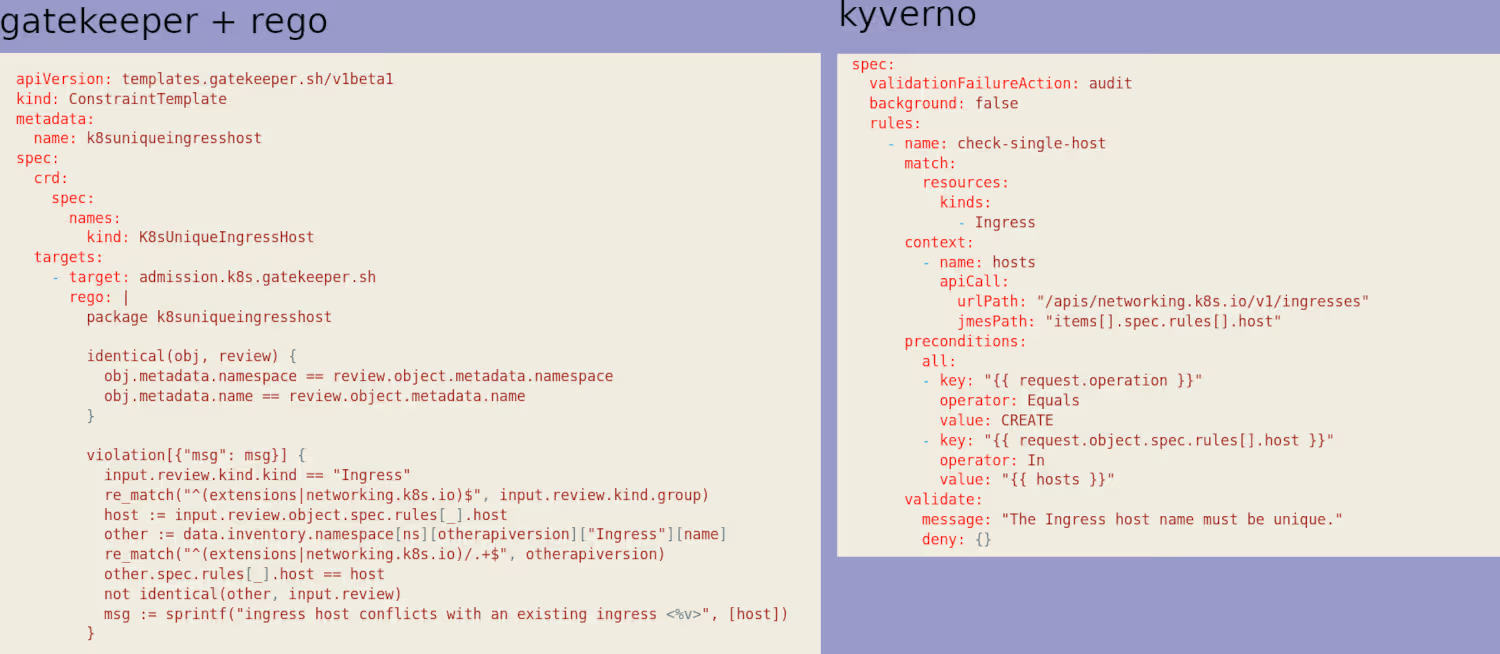
My (very personal) take is that rego is unreadable and verbose, and therefore unmaintainable. Again, this is personal, but I’ve never managed to get into it.
Without going as far as idealizing Kyverno’s language*, I find it is clearly much simpler to write, but more importantly, to read. If you ever need to modify/write/maintain your own policies, this will be very handy.
(*Yes, there is a language, especially for pattern matching… and as an annoying point, it’s not jsonpath like kubectl, but JMESPath, similar but not identical…)