Preamble
This tutorial is a kind of special edition in my series of articles on Proxmox VE 8.
In the third part which came out a few days ago, we stopped at a cluster of remote machines on the Internet.
They’re not in the same LAN, and to be honest, they’re even about 100ms apart (and it works very well).
At the end of the article, it works, we have a single network on our two machines, with a functional IPAM and DHCP on both sides. But still, virtual machines on different hosts can’t talk to each other directly and it’s still a bit unfortunate not to have gone all the way.
Rather than rewriting that part, I decided to make a small aside where I finish the work and test the VXLAN function of the Proxmox VE SDN, because YES, it can work all the way.
Prerequisites
I’m assuming you already have two (or more) machines within the same Proxmox VE 8 cluster.
If not, you’re in for reading my series of articles (currently being written) on the subject (have fun!):
These machines are not in the same LAN (otherwise no need to bother with VXLAN, the Simple SDN can be enough, as we did in part 3)
Problem
What we want to do is create an SDN that goes through the Internet, to the point that virtual machines believe they’re on the same LAN.
We can’t do this with Simple SDN, VMs on one host can’t contact VMs on another distant host on the Internet, even being in the same Simple SDN and with the same addressing plan.
But if we read a bit further in the PVE documentation on SDN, we see that this is precisely the use case highlighted for using VXLAN type SDNs:
The VXLAN plugin establishes a tunnel (overlay) on top of an existing network (underlay). This encapsulates layer 2 Ethernet frames within layer 4 UDP datagrams… […] You can, for example, create a VXLAN overlay network on top of public internet, appearing to the VMs as if they share the same local Layer 2 network
Small issue however, in reality, you’d better not do it, because frames are not encrypted, and on the Internet, it’s really not the best idea in the world…
Warning VXLAN on its own does does not provide any encryption. When joining multiple sites via VXLAN, make sure to establish a secure connection between the site, for example by using a site-to-site VPN.
As an alternative, we could have gone directly with the most complete/complex version of the Proxmox VE SDN: EVPN Zones
The EVPN zone creates a routable Layer 3 network, capable of spanning across multiple clusters. This is achieved by establishing a VPN and utilizing BGP as the routing protocol.
But I don’t want to mess with BGP here and I want to keep things simple. However, it’s probably the “cleanest” option for a production setup.
VXLAN Then, But with a VPN
I won’t overthink it, we’ll set up a small VPN with wireguard manually. There are tons of VPN tools on the market and tons of tools to make life easier. If you want more info on Wireguard, I’m sure you’ll find plenty, I’m just putting the bare minimum here so it “just works”.
On both servers, install wireguard, which should be in the default debian repositories:
apt update && apt install -y wireguard
Generate a key pair on each machine:
wg genkey | tee privatekey | wg pubkey > publickey
A little mental gymnastics, we’re going to write a configuration file with for each server, the private key of the server (file privatekey) we’re on, but the public key (file publickey) of the remote server.
(When you think about it, it’s obvious, but I prefer to insist)
And you obviously need to change addresses and network interfaces depending on which server you’re on so as not to have conflicts.
vi /etc/wireguard/wg0.conf
[Interface]
Address = 10.10.30.1/24
ListenPort = 51820
PrivateKey = <local server private key>
PostUp = iptables -A FORWARD -i wg0 -j ACCEPT
PostUp = iptables -t nat -A POSTROUTING -o <network interface name> -j MASQUERADE
PostDown = iptables -D FORWARD -i wg0 -j ACCEPT
PostDown = iptables -t nat -D POSTROUTING -o <network interface name> -j MASQUERADE

[Peer]
PublicKey = <remote server public key>
Endpoint = <remote server public IP>:51820
AllowedIPs = 10.10.30.2/32
Note: you can also add more nodes to the VPN, just add more “Peer” sections.
Finish by starting the VPN and verifying that nodes talk to each other:
systemctl enable wg-quick@wg0 --now

ping 10.10.30.1
ping 10.10.30.2
SDN Configuration
Normally, if you followed the previous articles, you already have the prerequisites, but for those who haven’t, I’ll repeat that in the /etc/network/interfaces file, it’s necessary to add at the end of the file the following line (followed by a small systemctl restart networking)
source /etc/network/interfaces.d/*
Then, in the Datacenter menu, open the SDN submenu.
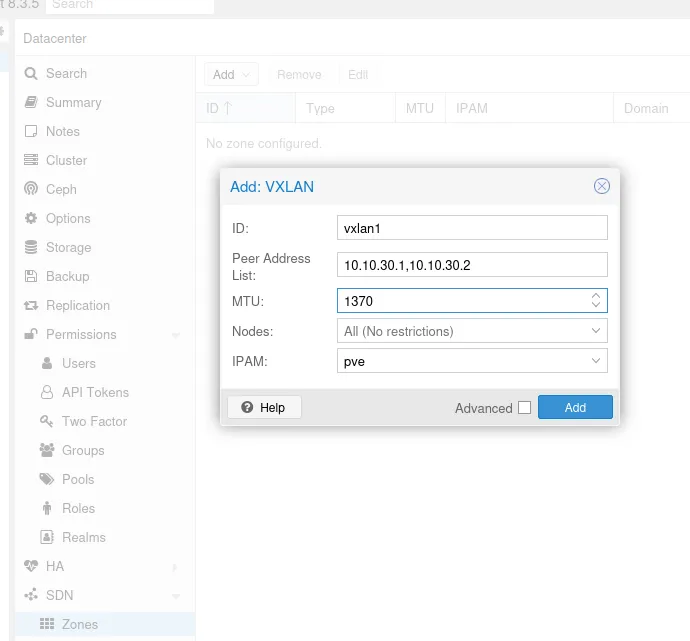
In the SDN/Zones menu, add a “VXLan” type zone. Two important points here:
- we need to fill in the list of all “peers”, here the IPs of our VPNs so 10.10.30.1 and 10.10.30.2
- we’ll need to adjust the MTU. By default, a frame is 1500. Except that wireguard for its encapsulation has reduced the MTU to 1420 and VXLAN encapsulation takes 50. So we need to set 1370 to best avoid fragmentation, at worst, dropped packets
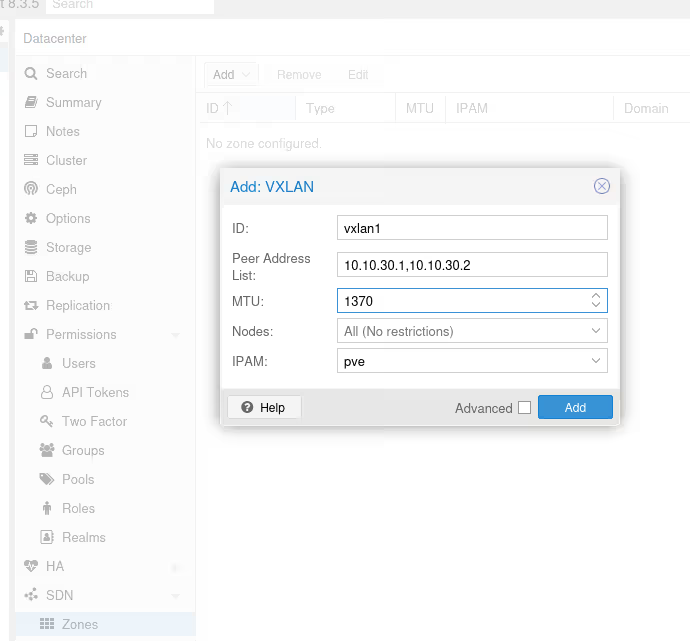
If you just read the previous article, you’ll notice that here, there’s no “checkbox” to enable DHCP on the zone. Unfortunately, that’s because it’s not available yet.
Currently only Simple Zones have support for automatic DHCP
Source: pve.proxmox.com/pve-docs/chapter-pvesdn.html#pvesdn_config_dhcp

Once you’ve validated, go to the SDN/VNets submenu, click the “Create” button to create a virtual network, then select it once created to create a subnet.
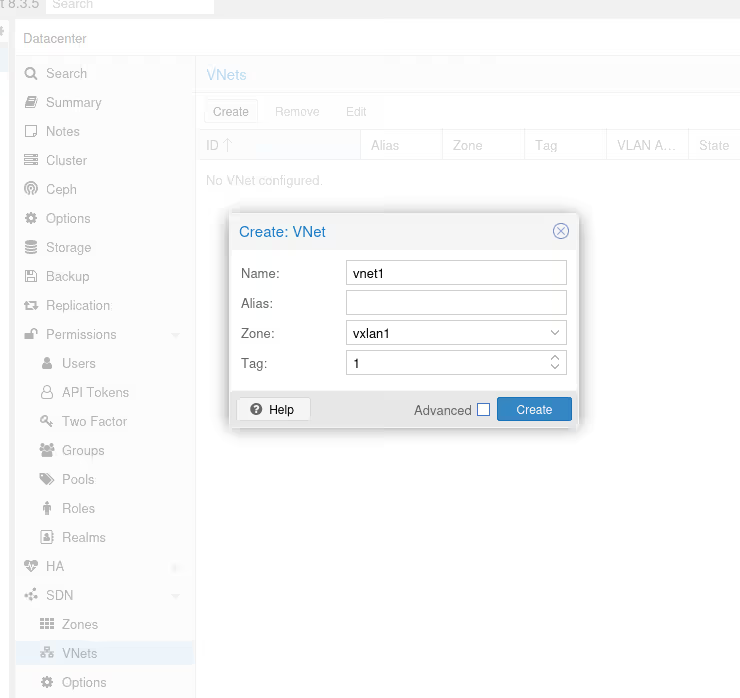
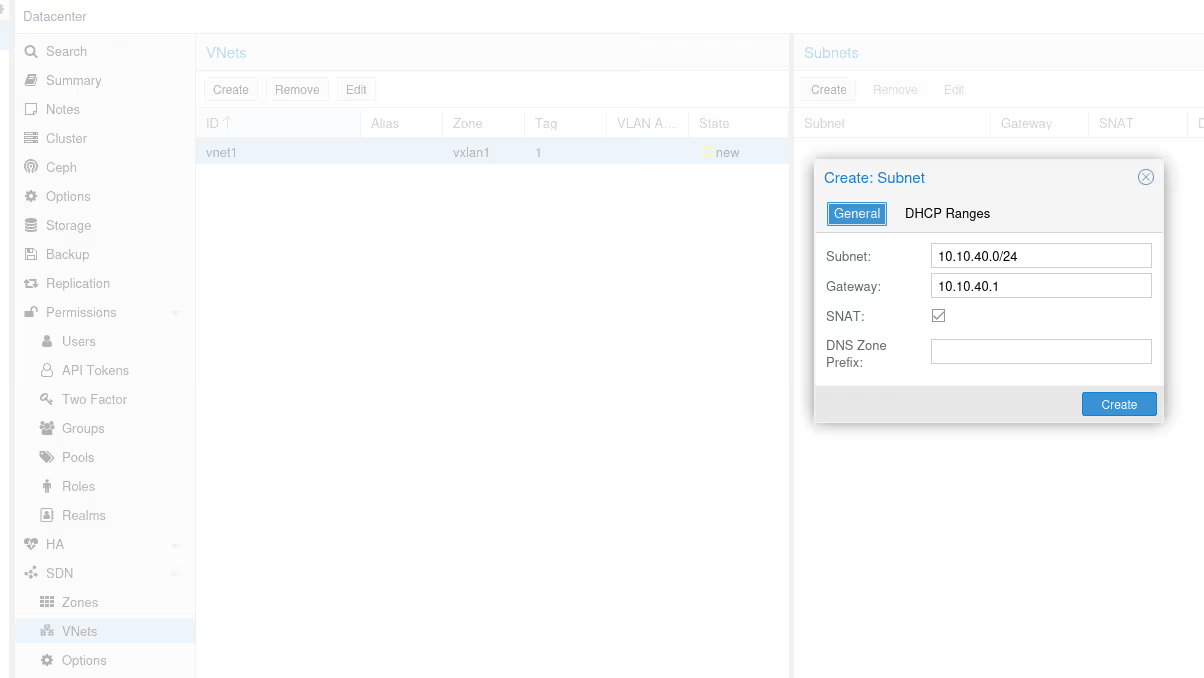
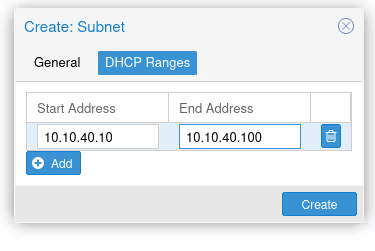
Once again, don’t forget to check the DHCP section, to declare the range for our future DHCP.
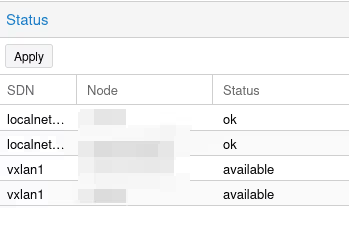
Once we’ve validated everything, we see that next to all these new things we’ve just created, there’s an icon with two yellow arrows and a “New” status.
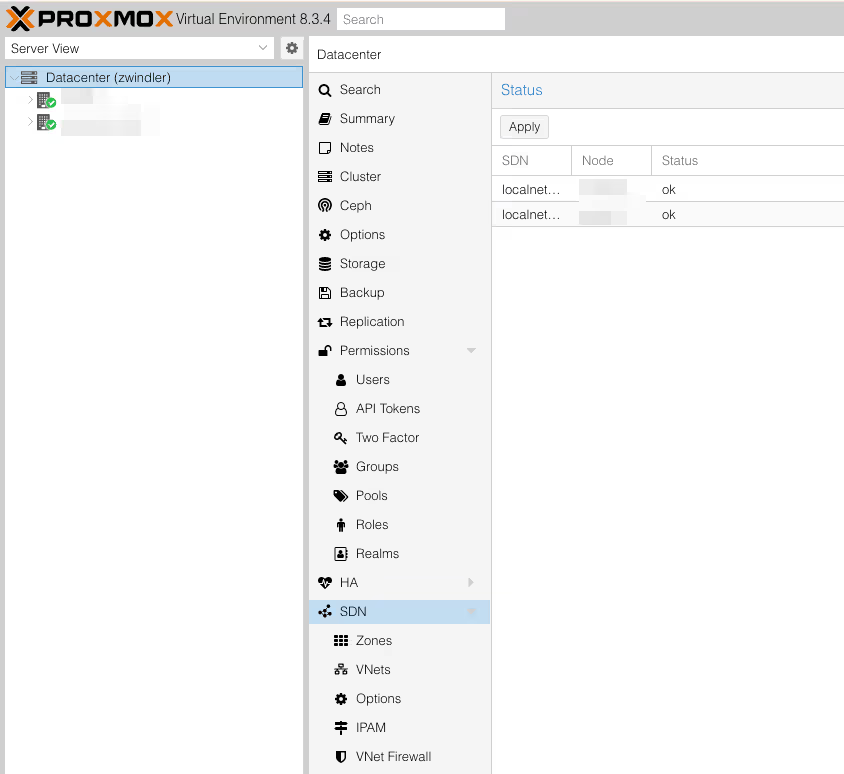
To deploy these changes, we need to go back to the SDN menu from the beginning, and click Apply. Two “vxlan1” lines (one for each server, actually) should appear.
Is That All?
Yes, that’s all, honestly, I really should have pushed a bit more before posting my previous article…
To convince yourself, just pop two LXC containers (without DHCP 🥲), one on each server, and see if they ping each other.
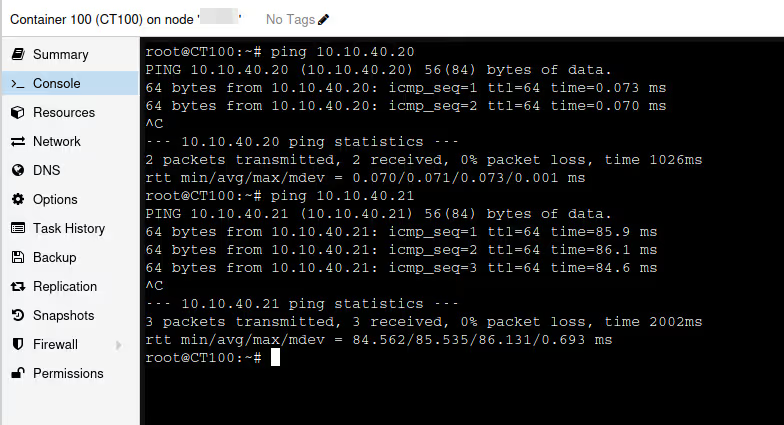
It works!
Well… all that’s left is to migrate all my existing machines to the VXLAN vnet to finally have a cluster where VMs can see each other!!